


By the time you finish reading the sentence “AI is transforming the way we work,” 10 more AI B2B SaaS startups will have launched. I’m ~3 months into my career and I can tokenize that phrase by hand. If you’re reading this, you want to understand AI (and its pain points) a little better, so let’s get to it.
Who I am
My team recently ran a 6-week experiment where we shipped real products without a single human-written line of code. It worked well enough that we wrote about it in Orchestrating Confidence and Context Engineering Explained in Pictures. This article is my take from inside those six weeks, which also happened to be the first six weeks of my career.
I thought my lack of coding experience would hamstring me, but it turned out to be the closest thing I had to an edge. When a tool is only 6 months old, nobody is a veteran (no matter how many job listings demand “5+ years of experience with Claude Code”). A developer with thirty years of pattern-matching and I both started near zero when it came to driving agents; I wasn’t fighting the old way of working, because I’d never had one.
However, I was missing a gut. Senior developers have a pattern bank that fires “this smells wrong” before they can explain why and the confidence to overrule a confident machine that’s designed to present its best guess as fact. I had none of that, so when an agent handed me 200 lines that looked perfect, I often couldn’t tell right from wrong. The problem of “who’s wrong, me or the model?” is what this whole article is about, and these tips come from me building a scaffold to replace judgment I’m still developing.
Who you are
You use generative AI regularly. You’ve had it save you an hour and cost you two in the afternoon. By the end of this article you should:
Know some high-level internals of how LLMs work
Recognize a few ways they fail
Have strategies for addressing failure beyond adding “make no mistakes” to your prompt
So who is this Claude person, anyway?
Most consumer AI products (ChatGPT, Gemini, the unhelpful support chatbot on most websites, etc.) don’t just prompt the LLM directly; there’s machinery around it. A typical interaction looks like this:
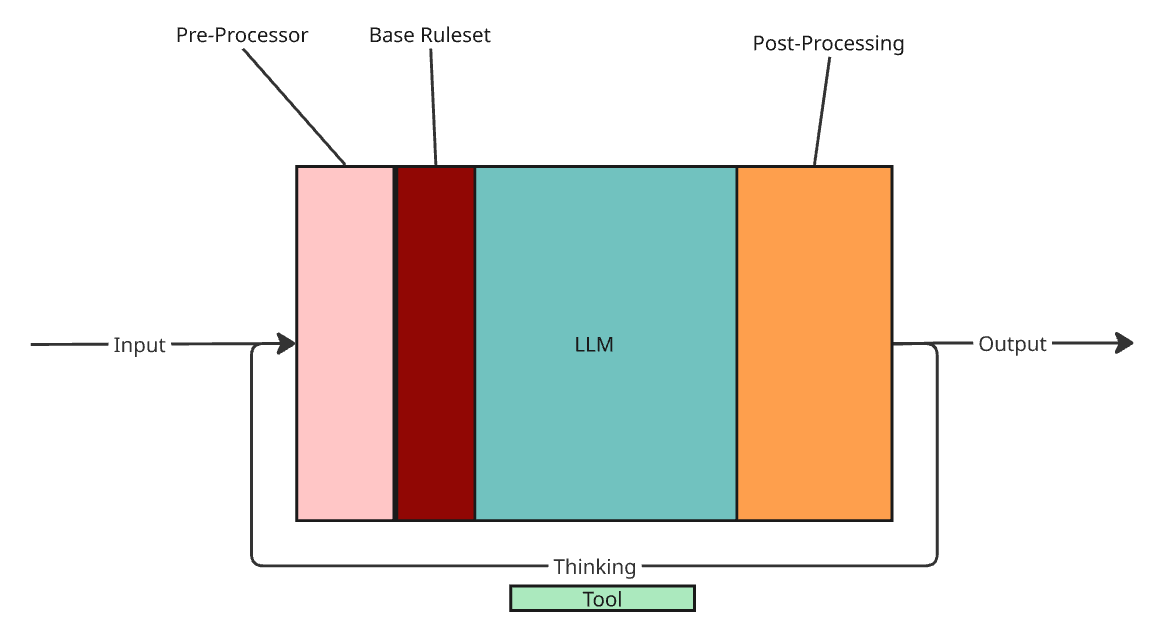
This is inference: the model produces an answer via a single next-token prediction loop. One pass = one turn. When the model says it’s “thinking,” the system is often running extra internal turns to refine before returning.
The diagram also includes tools: agents can read files, search the web, or otherwise interact with other programs to inform their answer to your query. The decision to call a tool is itself a product of these turns.
If we just needed one question and one answer, the article ends here. But we can be a little more creative than that, can’t we?
Contextcontextcontextcontextcontext
Since ChatGPT launched in 2022, conversations have been the default mode of interaction. We want agents that know our workload and adapt. The internal flow looks something like this:
You send a prompt.
The LLM assembles the context stack (system prompt + your prompt + conversation items).
Tool calls may run (jq, grep, etc.); results join the context.
The LLM produces output based on assembled context.
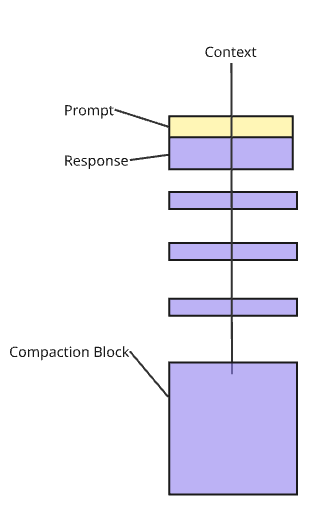
– Yellow = your prompt.
– Purple = conversation items: prior turns, inference loops, tool calls + results.
There’s no way for the LLM to remember the conversation, so each query feeds the entire conversation back to it so it can think of its next response.
Fun fact: this is where the word “Transformer” in “Generative pre-trained transformer” (GPT) comes from - each new part of the conversation transforms the meaning of the previous words!
Compaction keeps long conversations usable by summarizing older context before the window fills, and usually kicks in around 70% of the max context window size being reached. You can trigger it yourself with /compact.
In this way, context operates like a credit limit: use as little as possible and clear your balance often before “interest” accrues and your conversation gets repo’d.
Tool calls
The green rectangle under thinking refers to tool calls, which are essentially the LLM doing anything other than generating output from its knowledge base. Common examples include searching the web, running scripts, and writing a million Python scripts to read one file.
When the model drives tools, failure modes get loud.
Tool calls cost context both ways (the call and the result). Long sessions slow down for this reason.
Output masking is a concern. Many clients only show the last couple tool outputs in full. Older ones still exist as records, but you lose the “feel” of the session unless you summarize as you go.
MCPs aren’t always the answer. They are great for external tools (databases, auth-gated APIs), but consume lots of context, which even Anthropic has acknowledged. For stateless calls with clean text output, a library or CLI is often cheaper context-wise.
Instruction limits
You’ve probably hit one of these, but if you haven’t, you will. It’ll feel like the model “stopped listening” even though nothing visible changed. Nobody outside the model providers knows the exact mechanism, but the behavior is consistent: instructions act like semantic constraints with a soft budget. Go over and the system doesn’t complain, it just drops constraints silently.
Rough heuristic:
“Write a file, double space it” = 2 instructions
“Write a file, double space it, make the title size 16” = 3
A whole paragraph about one coherent constraint can still be one instruction.
Patterns:
Middle instructions get dropped more than first or last.
Constraints can get reordered or transformed as the conversation grows, so you don’t notice what’s been lost.
Hidden budget hogs:
Pre- and post-processing
Long-lived memory under ~/.claude (where Claude Code keeps your personal defaults)
CLAUDE.md and friends
NB: this is an intuition that matches real-world use, not an empirical claim about transformer internals.
Dumb zones
In my experience, there are two main ways agents start to lose the plot.
1. Instruction exhaustion. Much like any budget, it’s hard to operate once you blow it.
2. Context saturation. The window becomes full of stale tool outputs and abandoned reasoning paths. Throughput tanks, accuracy drops, and the agent starts missing things it “just saw.”
When both hit at once, you’re basically arguing with a sleep-deprived intern. The fix is boring but effective: keep CLAUDE.md small, prune old guidance, and prefer a technique called progressive discovery instead of front-loading a bunch of information.
Progressive discovery is a way of setting up folders for agents such that early instructions point to deeper ones, so the agent fetches detail only when it needs it.
Structuring a single prompt
Context budget matters across a conversation. Prompt shape matters inside a single message if you want to make sure you and your LLM are on the same page.
Put your most important constraint last. Models exhibit recency bias, so don’t bury important constraints under what you had for lunch that day.
Use explicit delimiters for reference material. Wrap pasted code, logs, or specs in fences or XML-style tags. Helps the model tell “context” from “instructions.”
Separate the what from the how. “Add a retry mechanism. Use exponential backoff, max 3 attempts.” is two clean constraints. Mash them into one sentence and one gets obfuscated.
Don’t lead the witness. Ask for 5 bugs, it finds 5. Ask for 10, it finds 10. The model satisfies the shape of your question, not its intent. Ask “are there bugs, and if so how many?” before asking for a count.
Same goes for “is X the right approach?”: it’s like asking someone “was that joke funny?” right after telling it — you’re not getting an honest answer. Instead, ask “what are the tradeoffs of X vs Y?”
Steering mid-flight
Most of your leverage is composing the prompt up front. The rest is correcting course without restarting.
Tab on yes/no. Most CLI tools let you add context to a yes/no answer. “Yes, and also check X.” “No, instead try Y.” This is cheaper and more token-efficient than re-prompting.
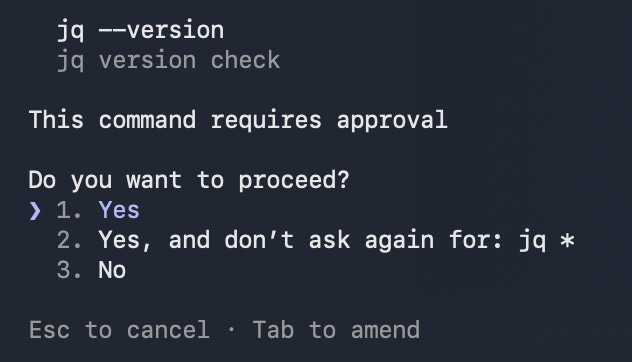
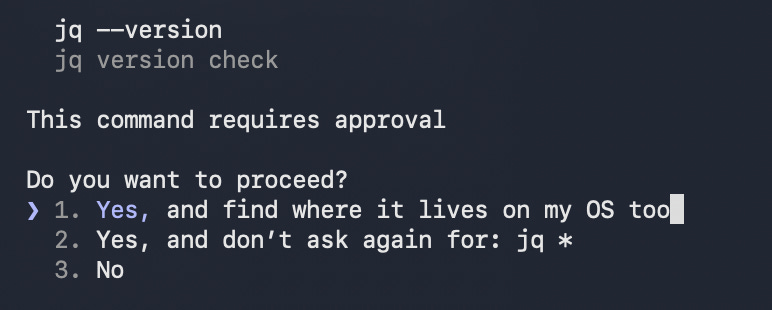
Interrupt + redirect. When you see it doing something that’s off course, Esc stops the current turn. Add what you actually wanted before the run wrecks things more.
What’s funnier than 24 agents? 25!
Agents look like magic if you’ve only used chats. Most of the power comes from two boring tricks: fresh context and tight feedback loops.
Subagents
A subagent is a mini-Claude spawned inside the session with a (mostly) fresh context window.
When the main thread is full but you still need something done, dispatch a subagent.
Subagents make good reviewers, especially with personas and framing like “you are a Java expert.” Tailored review and output can be extremely helpful.
On my team, we have teams of 3 agents review one agent’s work, which is a practice we affectionately refer to as “minority reporting”.
The natural extrapolation of this instinct is to create agents with roles, reviewer hierarchies, and multi-phase orchestration. That instinct is exactly the basis of Context Engineering Explained In Pictures.
A note on cost
I had a blank check during this experiment, so take my liberal subagent use with a grain of salt. If you’re paying per token:
A subagent isn’t free; it carries the system prompt, inherited context, and its own tool calls. A quick dispatch can cost as much as several turns in the main conversation.
A subagent that saves your main thread from saturation is probably still net-cheaper than the corrections you’d pay for after hallucinations.
If cost is tight, bias toward
/clear,/compact, and fresh threads. You lose return-to-parent, but avoid paying for two contexts.
Skills
Skills are scripts for Claude, except the “code” is language instructions. Invoke with /, e.g. /my-skill.
Two scopes:
Universal (
~/.claude): personal defaults.Project (
.claude/in folder): applicable to the given folder, can be shared with teams. Do not leave your personal/update-resumeskill in here!
Best for:
Places the model “weasels” (skips steps, hand-waves validation)
Places you want reliable, repeatable behavior
Making a repo agent-ready
AI works best when the folder it’s working in is scaffolded for it:
Short CLAUDE.md at root: north star, points to deeper docs
Repeated workflows in .claude/skills/.
Deeper truth (architecture overviews, runbooks, design decisions) in docs/. Add small local CLAUDE.md files near sharp edges like sensitive code and do-not-touch areas.
If the above sounds familiar, it’s because it’s another shameless plug for progressive discovery! Orchestrating Confidence gives a fantastic reference point for a human-in-the-loop workflow with these principles.
My two tokens
The most useful things I learned weren’t tactics for making the AI produce output, but reining the output in. Here are some field notes from and beyond the experiment:
When you can’t tell if the agent is wrong, use the Socratic method. I found making agents show their work, then checking the steps worked a lot better for my understanding than merely judging code from its conclusion. If it can’t explain in plain language, it can’t fix it.
The fastest path is sometimes to stop prompting and read the code. There’s a joke that AI turns a 10x engineer into a 100x engineer and a 0.1x engineer into a 0.01x engineer — it multiplies whatever judgment you bring, including none. If you’ve spent ten minutes getting the agent to explain a 200-line function, you could’ve read it in three. The agent amplifies comprehension; it doesn’t replace it.
Lateral connection. LLMs struggle with cross-domain insight (e.g. planning, communicating, architecting, testing, and debugging). As a junior, I specifically lacked the pattern bank to connect them effectively. Orchestration can substitute partially, but having to supervise a bunch of agents with different functions can really ramp you up quickly on that type of thinking.
The slot machine effect. Once the agent is useful, the lever pulls itself. “One more prompt.” “One more test.” LLMs have no concept of time boundaries, but you do.
None of these are clever; they’re prosthetics for judgment I hadn’t grown yet. The surprise was that the prosthetics scale. A committee that compensates for my missing pattern bank can also affirm a senior’s instinct, or surface what they missed. Forcing the agent to justify itself in plain language turns out to be how you onboard someone new or hand work across timezones. What the team reached for to cover our gaps worked just as well for people without them, and eventually became the default.
Practical takeaways
If you remember anything from this article, make it this:
Treat context like a credit limit. A fresh thread when the goal changes always works better.
The job is less “write code,” more “pour concrete so the agent can’t run into the swamp.”
Prefer tight loops. One small step, then deterministic validation through tests, manual review, documented reminders, and simple checks.
Write constraints the agent can’t weasel out of. Explicit success and failure conditions are the keys to success.
Use tools for ground truth. When accuracy matters, have the agent retrieve facts instead of “recalling” them.
When things get weird, pull the plug. New framing, new subagent, reset > arguing harder.
When the agent is thrashing, go Socratic. Make it explain in plain English before it drives the work.
Parting notes
When I started, I had no professional coding experience outside internships. Now I’ve helped create real value, burned through more context windows than I can count, and learned more about how these tools fail than most people do in months of casual use; partly because I had to ramp fast, partly because of an incredibly patient team.
Your path will look different, but the loop is the same: try something, notice what went wrong, adjust, repeat. Sound familiar? It’s the same loop the article has been about.
Thanks in no particular order to Zoe Gagnon, Jeff Schomay, Josh Kennedy, Randy Coulman, Jeffrey Matthias, Patrick Tschorn, and the early career crew at MO for direct review, the advice behind this article, and/or putting up with my AI teething phase.
 | A guest post by
|
W post! Mechanical engineering or ML or anything like that is the new S tier degree
Pure CS is now Wood